Subtitle Editor
Open an SRT or VTT file, or turn your transcript or screenplay into subtitles. Time them while your video plays, fix sync and reading speed, and export SRT or VTT.
- No pop-ups. Just one movie plug.
- Your video stays on your computer
- Nothing uploaded
- Made by a filmmaker, for filmmakers
Video
Space play/pause · ← → back/forward 1 s (with Shift, 5 s) · while typing, use Alt + [ or ]
Sync, frame rate and rules
Positive moves later, negative moves earlier. Use this when every subtitle is off by the same amount.
Use this when subtitles drift further out as the film goes on.
Subtitles
Paste a transcript or subtitles
No subtitles yet. Open an SRT or VTT file, a screenplay or a transcript, paste text above, or add them one at a time.
Subtitles saved.
Free tools, no catch. If you want to give back, check out my indie movie.
Why is it free?
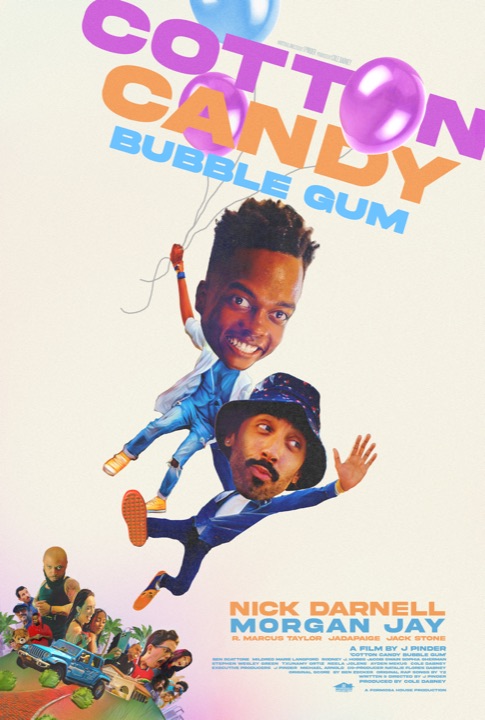
I'm J Pinder, writer and director of Cotton Candy Bubble Gum, and I'm spreading the word about my first indie feature, which premiered at SXSW. I made the film on 0% APR credit cards, so an unconventional marketing plan felt right: build tools people actually need, give them away, and skip the ads. If you find them useful, check out Cotton Candy Bubble Gum, starring Nick Darnell and Morgan Jay.
More about the film on IMDb →Questions
How do I time subtitles to my video?
Open your video and your text, click the first subtitle, and play. Press [ when the line starts and ] when it ends; the next subtitle is selected automatically, so you can keep going. Slow the video to 0.75× or 0.5× if lines come fast. Click a subtitle's number to jump the video to it.
Can I make subtitles from my screenplay?
Yes. Open the PDF, Final Draft, Fade In, Highland or Fountain file and every line of dialogue becomes a subtitle, split into readable pieces and wrapped to two lines. They come in untimed; time them against your cut as above. Actors change lines on the day, so read along and fix the text as you go.
What do the warnings mean?
They follow common streaming delivery rules: up to 42 characters a line, two lines, on screen for at least 0.83 seconds and at most 7, and no faster than 20 characters a second to read. Change the numbers under "Sync, frame rate and rules" to match a festival's or distributor's spec. "Next one to check" jumps through them.
My subtitles are out of sync. What do I do?
If every subtitle is off by the same amount, Shift them all by that many seconds. If they start right and drift later and later, the subtitles were made for a different frame rate: use Retime, usually 23.976 → 25 or the reverse.
Is my video uploaded?
No. It plays straight from your computer inside this page. Your subtitles are saved in this browser as you work, and nothing leaves your device until you download a file.
Why is it free?
I'm J Pinder, writer and director of Cotton Candy Bubble Gum, and I'm spreading the word about my first indie feature, which premiered at SXSW. I made the film on 0% APR credit cards, so an unconventional marketing plan felt right: build tools people actually need, give them away, and skip the ads. If you find them useful, check out Cotton Candy Bubble Gum, starring Nick Darnell and Morgan Jay.